
Invoicing
Invoiced before the car leaves the lot
Build a clean invoice in minutes, take payment by card or bank, and email the receipt. The free plan covers unlimited estimates and invoices with no credit card.
What changes
The invoice stops being homework
No more writing it up at 6pm. It goes out at the counter and comes back paid.
- Get paid on the spot
- Take card or bank payment on the invoice and email the receipt before the customer pulls away.
- It looks like your shop
- Your logo and details on every invoice. Paid plans remove the Repair Receipts footer entirely.
- Estimate becomes invoice
- Approved work carries straight over. Parts, labor, and totals transfer without retyping.
- Nothing sits unpaid
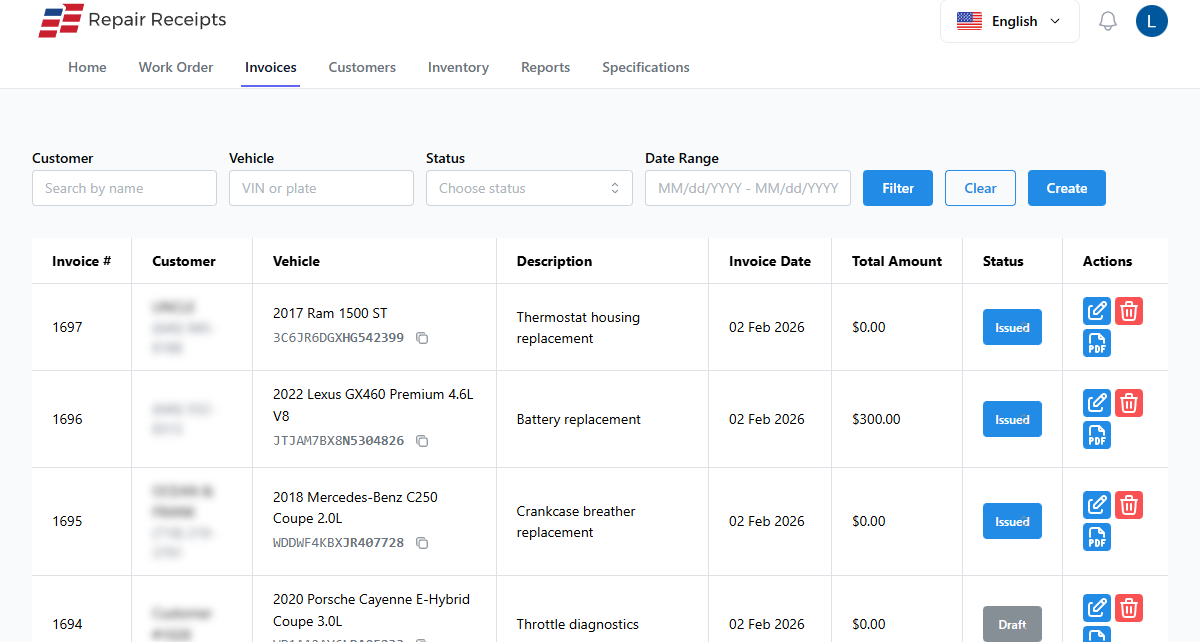
- See paid, pending, and overdue at a glance instead of digging through a stack of carbons.
Features
What you'll actually use every day
Build it, send it, get paid, on one screen.
- Clean, branded invoices
Add your logo and business details, and let the app write the line descriptions for you.
- Card and bank payments
Take credit and debit cards or a bank (ACH) payment on the invoice. Record cash or check in a tap.
- Estimate to invoice
Turn an approved estimate into an invoice with one tap. Every line item comes with it.
- Signed approvals
Send an estimate by a secure link. The customer reviews it and signs off before you start the work.
- Email and text delivery
Send the invoice by email or text. The customer gets a link to view it and pay online.
- Payment status at a glance
Every invoice shows paid, pending, or overdue, so you always know who still owes you.
How it works
From invoice to paid
The whole thing happens at the counter, not at home.
Build the invoice
Add services, parts, and labor. The app writes the descriptions and totals it up for you.
Send it
Email or text the invoice with a link the customer can open and pay from any device.
Take payment
The customer pays online by card or bank, or you record a cash or check payment in person.
Email the receipt
The receipt goes out automatically and the invoice is marked paid. The car leaves squared up.
Frequently Asked Questions
What payment methods can I accept?
You can take credit and debit cards and bank (ACH) payments online through the invoice. For in-person payments, you can record cash, check, or other methods against the invoice.
Can customers pay from their phone?
Yes. When you email or text an invoice, the customer gets a secure link to view it and pay online from a phone, tablet, or computer.
Can I add my logo and customize invoices?
Yes. Every plan lets you add your shop logo and business details. Paid plans remove the Repair Receipts footer so the invoice is fully your own.
Can I turn an estimate into an invoice?
Yes. Send an estimate for a signed approval, then convert it to an invoice in one tap. All the parts, labor, and line items carry over automatically.
What does it cost to start?
The free plan covers unlimited estimates and invoices with no credit card required. Paid plans start at $19.99/month and add the VIN barcode scanner, license plate lookup, and auto-generated invoice descriptions.
Send your next invoice here
Free plan, no credit card, and unlimited invoices from the first ticket.