
Parts and labor
Quote a number you can stand behind
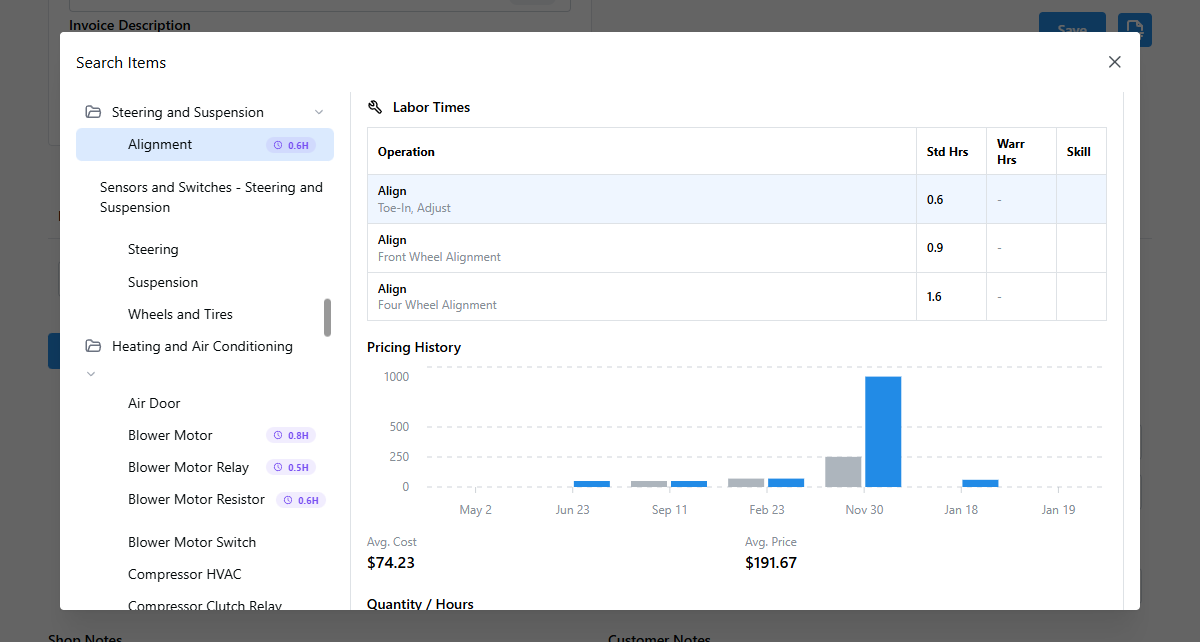
Look up real parts prices and book labor times while you build the estimate. The quote reflects what the job actually costs, not a guess scribbled on a pad.
What changes
The estimate stops being a guess
Real parts prices and book labor hours mean fewer callbacks and fewer jobs you lose money on.
- Charge what it costs
- Pull a real parts price into the estimate so you're not eating the difference when the invoice hits.
- Book labor, not guesses
- Quote with book labor times instead of a number you pulled out of the air.
- Faster estimates
- Parts and labor drop onto the estimate as you build it. No flipping through a paper guide.
- Same quote every time
- Whoever writes the ticket quotes off the same prices and the same book times.
Features
What you'll actually use every day
The numbers you need to price a job, right on the estimate.
- Parts price lookup
Look up parts and prices while you build the estimate, so the quote reflects a real number.
- Book labor times
Pull book labor hours for the job instead of guessing. Quote a time you can defend.
- Your prices, your way
Set your own labor rate and part prices. Every estimate uses them so the shop stays consistent.
- Descriptions written for you
The app writes clean line descriptions from the parts and labor, so the estimate reads professional.
- Estimate to invoice
Once it's approved, the priced estimate becomes the invoice. The numbers never get retyped.
- Adjust before you send
Override any price or hour on a line before it goes out. Give the discount or add for a tough job.
How it works
Priced right, in one pass
Build the estimate and the numbers come with it.
Set your rate and prices
Enter your labor rate and the prices you charge. They apply on every estimate from then on.
Look up parts and labor
Pull real parts prices and book labor times onto the estimate as you add each line.
Adjust and send
Tweak any line if you need to, then send the estimate for a signed approval.
Invoice the approved work
The priced, approved estimate becomes the invoice. What you quoted is what you charge.
Frequently Asked Questions
Where do the labor times come from?
The labor guide provides book labor times for the job, so you can quote real hours instead of estimating. It is available on the Established plan.
Can I look up parts prices while building an estimate?
Yes. You can look up parts and pricing directly on the estimate, so the number you quote reflects a real cost rather than a guess.
Can I set my own labor rate and prices?
Yes. You set your labor rate and the prices you charge, and every estimate uses them. That keeps quotes consistent no matter who writes the ticket.
Can I adjust the price on a single job?
Yes. You can override the price or hours on any line before you send the estimate, so you can give a discount or add for a tougher job.
What does it cost to start?
The free plan covers unlimited estimates and invoices with no credit card. Parts lookup comes with paid plans, and the book labor guide is on the Established plan at $44.99/month.
Price your next job here
Free plan, no credit card, and estimates that match the invoice.