
Workflow
Know where every car is without walking the shop
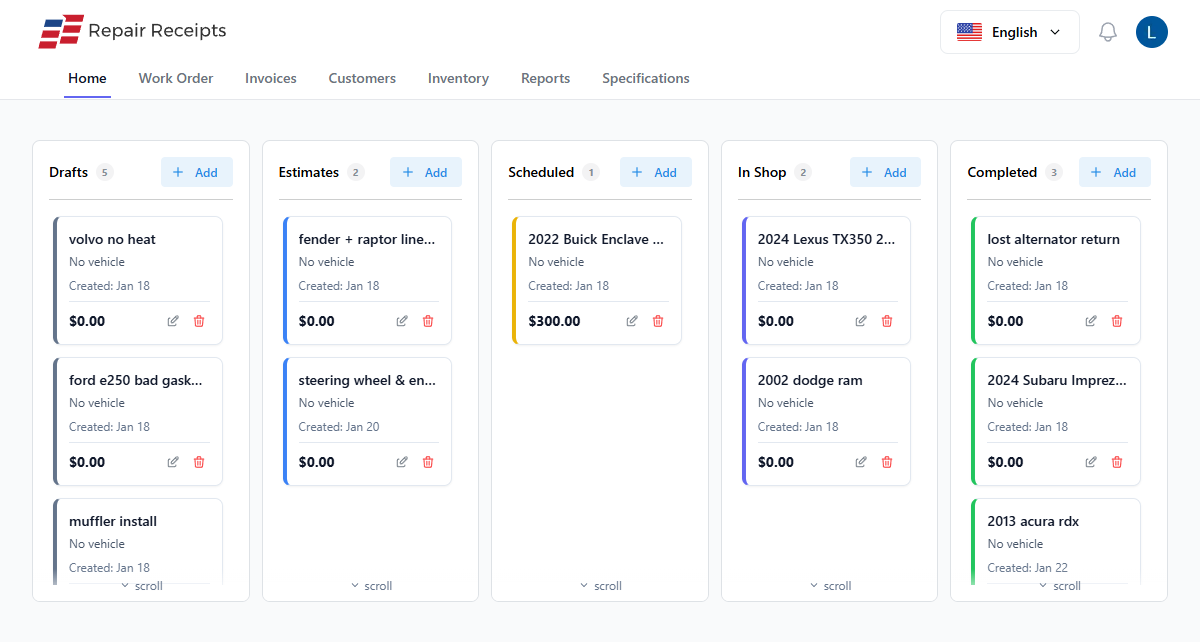
Check a car in on a tablet, move it across the board as the work goes, and see the whole floor at a glance. No more clipboards on the wall.
What changes
The board replaces the wall of paper
One screen shows every car and its stage, so you stop answering where's my car by walking to the bay.
- See the whole floor
- Every car and its stage on one board. Answer where a job stands without leaving the counter.
- Nothing gets lost
- Cars move across the board, not into a pile of work orders that slides behind the desk.
- Approvals in writing
- Send the estimate, get a signed approval back, and start the work with authorization on file.
- The customer stops calling
- Send a link so they can see their car's status themselves instead of tying up your phone.
Features
What you'll actually use every day
Check-in to delivery, on one board.
- Digital check-in
Capture the vehicle, the customer's concern, and photos at intake. Scan the VIN to fill in the details.
- Drag-and-drop board
Move each car through your stages with a drag. See what's waiting, in progress, and ready at a glance.
- Custom stages
Set the stages your shop actually uses, from waiting on parts to ready for pickup.
- Signed approvals
Send an estimate by secure link. The customer reviews and signs before you turn a wrench.
- Digital inspections
Run inspections on a tablet and attach them to the job, so the findings live with the car.
- Customer status link
Share a link so the customer can watch their car move through the shop without calling in.
How it works
From check-in to keys back
The car moves across the board, not into a paper pile.
Check the car in
Scan the VIN, note the customer's concern, and take intake photos on a tablet.
Estimate and approval
Build the estimate, send it, and get a signed approval back before the work starts.
Move it across the board
Drag the car through your stages as the work goes. The floor stays visible to everyone.
Inspect and deliver
Run a final inspection, invoice the work, and hand back the keys squared up.
Frequently Asked Questions
Can I customize the workflow stages?
Yes. Set the stages that match how your shop runs, such as Check-In, Waiting for Parts, In Progress, and Ready for Pickup. Add or rename stages as you need.
How do jobs move across the board?
You drag a car from one stage to the next on the board. It works from a computer, tablet, or phone, so anyone on the floor can update where a car stands.
Can customers see their vehicle's status?
Yes. You can share a link so the customer sees which stage their car is in, which cuts down on calls asking for an update.
How does the approval work?
When an estimate is ready, send it by email or text. The customer reviews the work and signs off with a secure link, and you have the authorization on file before starting.
What does it cost to start?
The free plan covers unlimited estimates and invoices with no credit card. Paid plans add the VIN barcode scanner, license plate lookup, and auto-generated descriptions to speed up check-in and estimates.
Put your next check-in on the board
Free plan, no credit card, and the whole floor on one screen.